
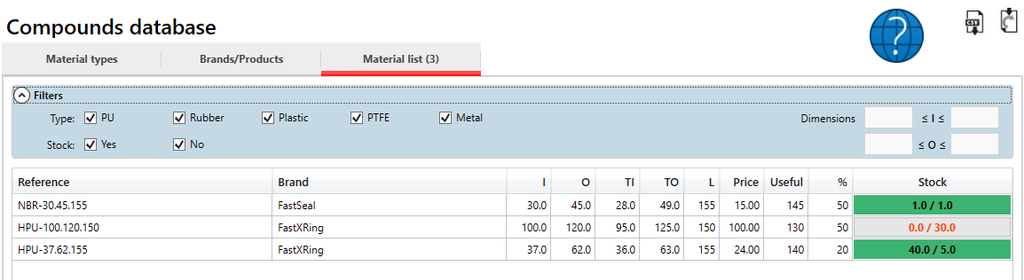
The list of materials can be seen on the material list.
This list corresponds to the materials registered on the software and relates the materials types, brands and products defined on the previous tables.
A user without permissions, cannot edit this contents
Import and export
On the top right of the screen, there are buttons to import and export the materials. For more information please check the instructions in Import compounds
Filters
The filters are useful to find materials and to restrict the amount of items present.
The dimensions filters if empty do not set any restriction and currently only a filter is implemented for the I (inside useful dimension) and the O (outside useful dimension).
Table contents
The content of the table can be described as:
| Header | Description |
| Reference | Material reference as set when adding the material |
| Brand | The brand of the material, should be one of the existing brands |
| I | Inside useful dimension, normally what is on the material sticker |
| O | Outside useful dimension, normally what is on the material sticker |
| TI | Tube inside dimension, measured on the tube |
| TO | Tube outside dimension, measured on the tube |
| L | Length of the tube |
| Price | Price of the tube (visible or not depending on the user permissions) |
| Useful | Useful length of the tube |
| % | Margin % for profile (visible or not depending on the user permissions) |
| Stock | Stock. First value corresponds to the actual stock, second value to the desired stock, set on the material settings |